Learn how to set up the Gala node in 10-15 minutes.
What is Gala Node?
By becoming a Gala node, you help to secure the network. In return, you get daily distribution in the form of Gala tokens, NFT, game items, and the Townstar coins. If you believe in Gala games, this is the best way to support their growth.
The Gala token has been appreciated in recent times along with its popularity. You can buy Gala tokens from the following exchanges:
How to Set Up Gala Node?
You can set up the Gala node in a few steps on your local or cloud server. The cloud server is better as it runs 24*7 for which you have to pay a nominal fee of $20/month to run the server. I’m using the Vultr server, which is currently offering a $100 promo using this link, which means your first 5 months are free.
Here are steps needed to set up a Gala node:
- Setup Gala account and buy a Gala Node
- Buy server for Gala and deploy a server
- Connect Server with Terminal or Putty and Change Machine ID
- Connect and Setup Gala node
- Useful tips for Gala node owners
Let’s get started.
Step 1: Setup Gala account and buy a Gala node
This is a three-step process.
- Create a Gala account
- Fund your account using ETH
- Buy the Gala node license
The first thing you need to do is to create a Gala account and set up your profile including 2FA. Following this, click on inventory and deposit the required ETH to buy the Gala node.

As the price depends on current market, you must calculate ETH required to buy Gala. At the time of writing, buying a founders Gala node costs around 29 ETH ($90,000).

Click on place order, and make payment to confirm your purchase of the Gala node license.
Once this is done, we will move to the second and most important part.
Step 2: Buy a server for Gala and deploy
You have multiple options to run a Gala node server. Here I’m sharing the exact steps you need to follow to launch your server.
We are using the Vultr server (cloud infrastructure) that helps deploy Linux or Windows machine type on the cloud. You can deploy your server on Windows or Linux per convenience.
In this guide, we will only be using Linux. If you want to deploy on Windows, you should check out this tutorial.
$100 free cloud server
When I logged into my Vultr server, I saw it’s offering a $100 free promo for the new users. I got only $50 using someone else’s promo, but you can use the link below to take advantage of the $100 promo. It means that your first 5 months are free.
Get a $100 free Vultr account
Once you have created your Vultr account, you need to buy a server. Here you can see the latest requirement for running a Gala node. At the time of writing, these are as follows:
- 4 GB RAM
- 2 CPU Cores
- 60 GB Disk Space
On Vultr, select Cloud Compute and choose your nearest location.

Select Ubuntu as your server type and version 20.04 x64

Now pick any plan that requires the same config.
- 4 GB RAM
- 2 CPU Core
- 60 GB Disk Space

It should cost around $20/month and with a $100 promo, your first five months are free.
In the ‘additional features’ section, no need to select anything. Name your server and click on deploy when you are ready.
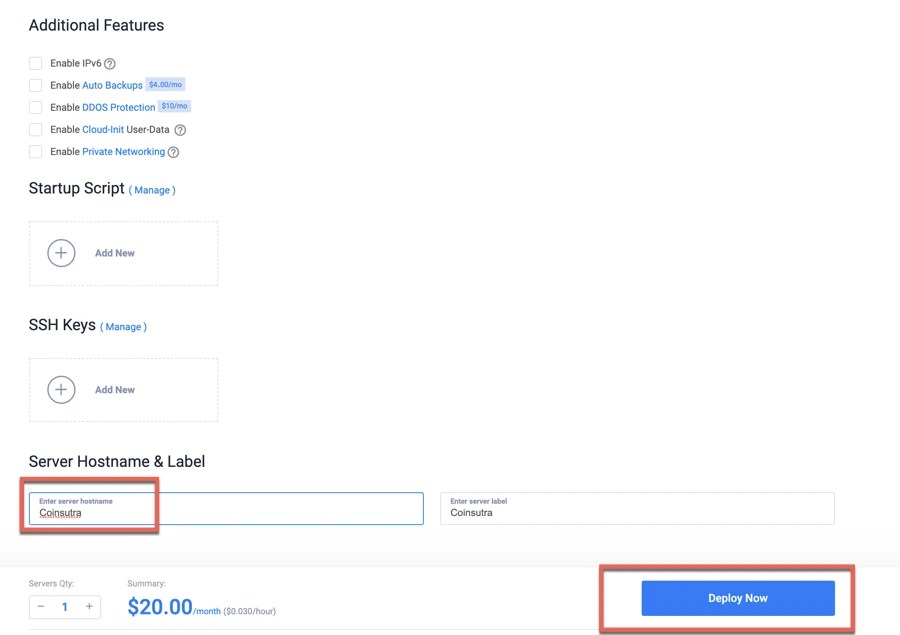
Your server should be live within a minute.

You can click on the server name to find more details that should look like the following image. 
You need to enter an IP address, username, and password in the next step to connect with the server.
Step 3: Connect to your server and change the Machine ID on Linux
Connect with your server via SSH tool such as Putty (Graphical interface) or via Terminal on Mac.
If you are using Mac, you can use Terminal that is also a simple tool.
Open the Terminal app (search Spotlight) on your Mac and connect with your server using these commands:
Type ssh [email protected] where x.x.x.x is your VPS IP address
Click on Yes, and copy-paste your password to log in to your newly created VPS server.
Before proceeding, change the Machine ID.
If you are wondering why you have to do this, you can read it here.
Here are the three commands you need to run:
sudo rm /etc/machine-id /var/lib/dbus/machine-id
sudo dbus-uuidgen | sudo tee /etc/machine-id
sudo cp /etc/machine-id /var/lib/dbus/machine-id
Once this is done, reboot your server by using the command
sudo reboot

Once the server is rebooted, you are ready to install the Gala node server on your VPS server.
Log in to your server again by using the ssh [email protected] command again.
Step 4: Install and configure Gala node
Run the script: sudo apt-get update && sudo apt-get upgrade -y
Download the node software package. Type wget -O install-headless.sh https://static.gala.games/node/install-headless.sh; sudo bash install-headless.sh and hit Enter.
Follow the prompts. You are finally good to go!

Once the installation is complete, you will see the following link on your terminal.

Copy-paste the link in the browser and authenticate using your Gala login and 2FA (if enabled).


Select your node name, click on save, and then exit.

Congratulations! Your Gala node is active and running already!
Step 5: Verify everything and enjoy passive income
Now that the set-up is complete, verify everything before you enjoy your passive income.
Make sure to run the command gala-node stats and check for a value that says msActiveToday, which should not be more than 0. If not, rerun the command after 1 minute.
You can also go to your Gala account to see your connected node status under node info as shown in the image below.

As you can see, the founder’s node is online. Gala distributes daily rewards every 24 hours.
For Gala nodes owners, here is some useful info regarding Gala token:
- Currently, you can receive around 400 Gala (around $120 per day).
- For any future in game coin, you get a cut with founders node.
- Any NFTs released, 5% of the airdrop is allocated to founder nodes, including town nodes. If you are lucky, you may get one for free.
- Gala also plans to make these license as an NFT that you can resale in the future.
- Don’t forget that the halving of Gala rewards is in July 2022. But I am hopeful, more games will be out by then and those other coins make up for the difference. For example, town tokens increase 1% or so per day currently as the numbers of players is increasing.
With the current price of Gala ($0.35), you could earn $43800 in one year + price appreciation + airdrop + everything else.
Here are a few useful links for you to explore the Gala node.
Transparency Notice: CoinSutra content is reader-supported, which means if you click on some of the links on this website, we may earn a small referral fee. Please know that we only recommend products that we use ourselves and/or believe will add value to our readers.
How’s your experience as a Gala node owner? What do you think is the future proposition of the Gala ecosystem? Are they designing and launching the games to support the kind of ecosystem they are building? Let me know your answers in the comment section below.
How many Gala founders nodes are there?
There would be a maximum of 50,000 Gala founders nodes, and after that, there will be paid and free nodes.
Is running a Gala founders node profitable?
At the time of writing, the Gala founders node costs around $90,000 and gives a return of $100-150/day. In July 2022, the rewards would be halved, and only time would tell what distribution would be there. The biggest silver lining is when you can sell your Gala founders node as an NFT, and due to scarcity principles, you should be able to sell it at a higher price than your cost price.

Harsh Agrawal is the Crypto exchange and bots expert for CoinSutra. He founded CoinSutra in 2016, and one of the industry’s most regarded professional blogger in the fin-tech space.
An award-winning blogger with a track record of 10+ years. He has a background in both finance and technology and holds professional qualifications in Information technology.
An international speaker and author who loves blockchain and crypto world.
After discovering about decentralized finance and with his background of Information technology, he made his mission to help others learn and get started with it via CoinSutra.
Join us via email and social channels to get the latest updates straight to your inbox.
Comments
Post a Comment